Secret Requests
Sharing a secret is only half the story — often you need to receive one: a customer's API key, a database password from a colleague, credentials from a contractor. Secret requests turn the Yopass flow around while keeping the same end-to-end encryption guarantees.
Instead of asking someone to "just email it", you send them a request link. Whatever they type — or whatever file they upload — is encrypted in their browser with a public key that belongs to you, and can only be decrypted in your browser with a private key that never leaves it. The Yopass server only ever sees a public key and ciphertext.
Requires a valid license. Secret requests are a business feature gated behind
--license-key.
How it works
- Create a request. Your browser generates a fresh ECC key pair. The public key is registered on the server together with an optional label and an expiration (1 hour, 1 day, or 1 week). The private key and a management token are stored only in your browser. The label is stored in plaintext and shown to the responder — see the security model below.
- Share the link. The request link (
https://yopass.example.com/#/r/<id>/<fingerprint>) can be sent over any channel — chat, a support ticket, email. The fingerprint fragment lets the responder's browser verify the encryption key it receives from the server, and is never sent to the server itself. - The responder submits the secret. They open the link and either type the secret or upload a file (a certificate, a key file, a kubeconfig). Either way it is encrypted with your public key before leaving their browser. No account, no app, nothing to install.
- You collect the secret. The request list shows the state of every request. Once a secret is provided you decrypt it locally — a text secret is shown for copying, a file is offered for download under its original name — and the ciphertext is deleted from the server the moment you retrieve it.
File responses
The responder can answer a request with a file instead of text. The file's content and its filename are placed inside the encrypted OpenPGP message, so the server never learns either — it only stores the ciphertext and the fact that a file (rather than text) was provided, which it uses for size-limit enforcement and the requester uses to choose text or file presentation.
- File responses are limited to 512 KB, or
--max-file-sizeif that is lower. The limit is deliberately independent of large--max-file-sizevalues: unlike regular uploads, file responses are always stored in the database backend (never the disk/S3 file store) because they ride on the request record, and the cap keeps the full armored record within Memcached's default 1 MB item limit — no backend tuning required. The effective limit is exposed to the frontend asMAX_REQUEST_FILE_SIZEin/config. - File responses are turned off together with regular uploads via
--disable-upload; the responder then only sees the text input. - Requests fulfilled by servers or clients predating this feature are treated as text — old and new versions interoperate.
Request states
| State | Meaning |
|---|---|
| Awaiting secret | The link is live, nothing has been submitted yet |
| Secret provided | A secret is waiting — open it to decrypt and consume it |
| Collected | You retrieved the secret; it no longer exists on the server |
| Expired | The expiration passed before a secret was provided |
| Revoked | You cancelled the request; the link is dead |
Managing requests
The Requests page in the web UI lists every request created in the browser, with live status:
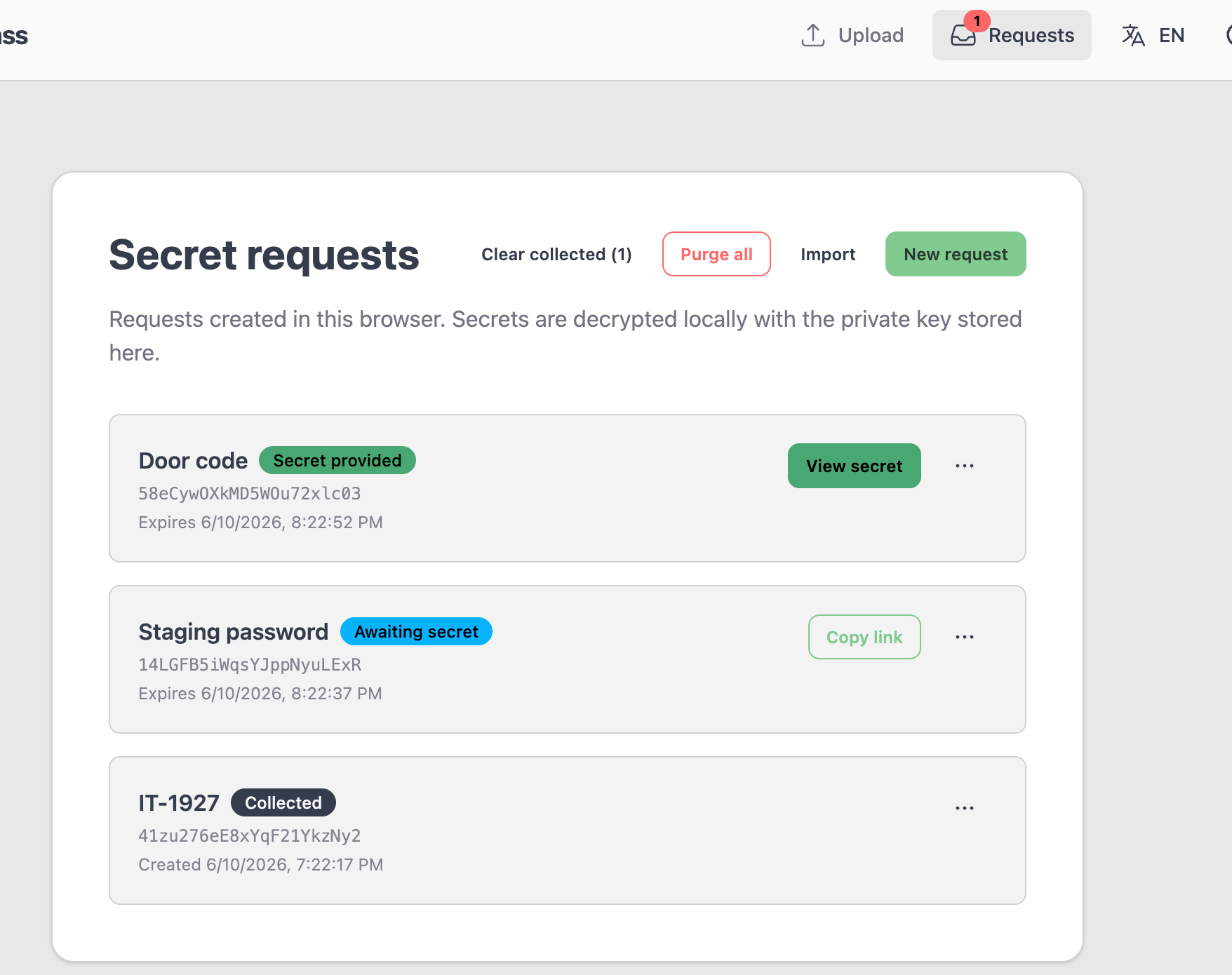
- Copy link — share a pending request again.
- Revoke — kill the link immediately. Any secret already provided is deleted from the server.
- Replace key pair — generate a new key pair and swap the public key on the server. Use this if you lost the private key (for example, the request was created in another browser) and the request is still pending. Previously shared links will fail their fingerprint check, so share the new link afterwards.
- Export / Import — move a request (including its private key and management token) to another browser as a JSON file. Treat the export as a secret.
- Clear collected — remove all already-collected requests (and their private keys) from the browser. The secrets themselves were deleted from the server the moment they were viewed.
- Purge all — revoke every active request on the server in one go and wipe everything stored in the browser: links stop working, provided-but-uncollected secrets are deleted, and all private keys and tokens are removed. Requests whose revocation fails (for example a network error) stay in the list so their keys are not lost.
The Requests entry in the navigation bar shows a counter badge with the number of requests whose secret is waiting to be collected, so a provided secret is hard to miss.
Security model
- End-to-end encryption. The secret is encrypted with OpenPGP public-key cryptography in the responder's browser. The server stores only the public key and the resulting ciphertext. For file responses the filename is inside the ciphertext too — the server sees neither the content nor the name of the file.
- Private key never leaves the browser. It is kept in
localStorageand is included only in explicit exports made by the user. - Link integrity verification. The link fragment carries the public key fingerprint. Since URL fragments are never sent to the server, a server that swapped the public key (to read secrets in transit) is detected by the responder's browser, which refuses to submit.
- One-time retrieval. Retrieving the provided secret deletes it from the server before the response is sent. Viewing it in the web UI is therefore a one-shot action — the UI asks for confirmation first, and once shown, the secret exists only in your browser until you copy or download it.
- Labels are not encrypted. The label exists so the responder knows what to provide: it is sent to the server in plaintext, stored in plaintext, and shown to anyone who opens the request link. There is no way to encrypt it — at the time the request is created there is no shared secret with the responder to encrypt it against. Never put sensitive information (credentials, hostnames you consider secret, personal data) in a label.
- Management token. Retrieval, revocation, and key rotation require a token returned once at creation time and stored alongside the private key. A bare request ID grants no control over the request.
- Atomic lifecycle transitions. State changes (fulfill, key rotation) are applied with compare-and-swap operations in the storage backend, so concurrent attempts cannot overwrite each other's secret or resurrect a revoked request — including when multiple yopass instances share one Redis or Memcached backend.
- Audit trail. With audit logging enabled, every interaction is recorded —
request.created,request.viewed(a responder opening the link),request.fulfilled,request.secret_accessed,request.revoked, andrequest.key_rotated— including denied and failed attempts, without ever logging secret content. A purge from the UI is recorded as onerequest.revokedevent per active request.
Enabling secret requests
Secret requests are enabled automatically when a valid license key is configured:
yopass-server --license-key "your-license-key"
| Flag | Env var | Default | Description |
|---|---|---|---|
--disable-secret-requests | DISABLE_SECRET_REQUESTS | false | Turn the feature off even with a valid license |
The feature is unavailable in read-only mode. The frontend discovers it through the SECRET_REQUESTS field of the /config endpoint.
REST API
Everything the web UI does is available over plain HTTP, which makes it straightforward to wire secret requests into ticketing systems, chat bots, or onboarding automation. All bodies are JSON.
Create a request
curl -X POST https://yopass.example.com/request \
  -H 'Content-Type: application/json' \
  -d '{
    "public_key": "-----BEGIN PGP PUBLIC KEY BLOCK----- ...",
    "label": "Production API key for ticket #4711",
    "expiration": 86400
  }'
{
  "id": "5Hp2…",
  "token": "wXg9…",
  "expires_at": 1765465600
}
expiration is one of 3600, 86400, or 604800 seconds. Keep the token secret — it authorizes retrieval, revocation, and key rotation. The link to hand out is https://yopass.example.com/#/r/<id>/<fingerprint>, where <fingerprint> is the last 16 hex characters of the public key fingerprint.
The label is stored and transferred in plaintext and displayed to anyone opening the request link — it cannot be encrypted, so keep it free of sensitive information.
Check the state of a request
curl https://yopass.example.com/request/<id>
{
  "public_key": "-----BEGIN PGP PUBLIC KEY BLOCK----- ...",
  "key_version": "b8c8d54f-640c-4c41-bda8-f2ed285dbe3d",
  "label": "Production API key for ticket #4711",
  "state": "pending",
  "expires_at": 1765465600
}
state is pending or fulfilled; an expired or revoked request returns 404. Polling this endpoint is how an integration knows when to fetch.
Submit a secret (responder side)
curl -X POST https://yopass.example.com/request/<id>/secret \
  -H 'Content-Type: application/json' \
  -d '{"message": "-----BEGIN PGP MESSAGE----- ...", "kind": "text", "key_version": "b8c8d54f-640c-4c41-bda8-f2ed285dbe3d"}'
The message must be PGP-encrypted with the request's public key. A request can be fulfilled exactly once; a second attempt returns 409.
Echo the key_version from the same lookup that supplied the public key used for encryption. It is an empty string before the first key replacement. If the key changes before submission, the server returns 412 and leaves the request pending; ask the requester for the new verified link.
kind is optional and defaults to text. Use kind: "file" when the encrypted message carries a file: the message is then bounded by the file response limit (512 KB, or --max-file-size if lower) instead of --max-length, and rejected when uploads are disabled (--disable-upload). For file responses the filename should be embedded in the OpenPGP literal data packet (as the web UI does), so it stays end-to-end encrypted.
Retrieve the secret (one-time)
curl https://yopass.example.com/request/<id>/secret \
  -H 'X-Yopass-Request-Token: <token>'
{
  "message": "-----BEGIN PGP MESSAGE----- ...",
  "kind": "text"
}
Returns the ciphertext and deletes the request from the server. Decrypt with the private key locally. kind is text or file and determines presentation; older responses without it are treated as text. A filename inside a text response does not turn it into a file. For a file, the decrypted literal data packet carries the filename and the binary content.
Revoke a request
curl -X DELETE https://yopass.example.com/request/<id> \
  -H 'X-Yopass-Request-Token: <token>'
Replace the public key
curl -X PUT https://yopass.example.com/request/<id>/key \
  -H 'X-Yopass-Request-Token: <token>' \
  -H 'Content-Type: application/json' \
  -d '{"public_key": "-----BEGIN PGP PUBLIC KEY BLOCK----- ..."}'
Only allowed while the request is pending.
Integration patterns
The API is deliberately small so secret requests can ride along in existing workflows:
- Ticketing (Jira, ServiceNow, Zendesk): when an agent needs credentials from a customer, an automation creates a request, posts the link as a ticket comment, and polls
GET /request/<id>— when the state flips tofulfilled, it notifies the agent to collect the secret in their browser. The agent's key pair stays in the agent's browser; the automation only handles the link. With webhooks configured, therequest.fulfilledevent replaces the polling entirely. - Onboarding automation: generate request links as part of provisioning flows ("submit your signing certificate here") instead of accepting credentials over email.
In every pattern the integration works with links and states, never with secrets — the cryptography stays between the two browsers.
Key rotation and API clients
Responder clients must send the key_version returned by GET /request/{id} with POST /request/{id}/secret. The version is checked atomically with fulfillment; a stale version returns 412 and leaves the request pending. Ask the requester for their new link instead of encrypting to a replacement key without verifying its fingerprint. Requests that have never had their key replaced still accept a missing or empty version for compatibility. Clients that omit the version cannot fulfill a request after key replacement.
Database lookup failures return 503 Database temporarily unavailable, allowing clients to retry. A transient storage outage is not reported as a missing or expired record (404).